Step 1 of 6
Add your first item.
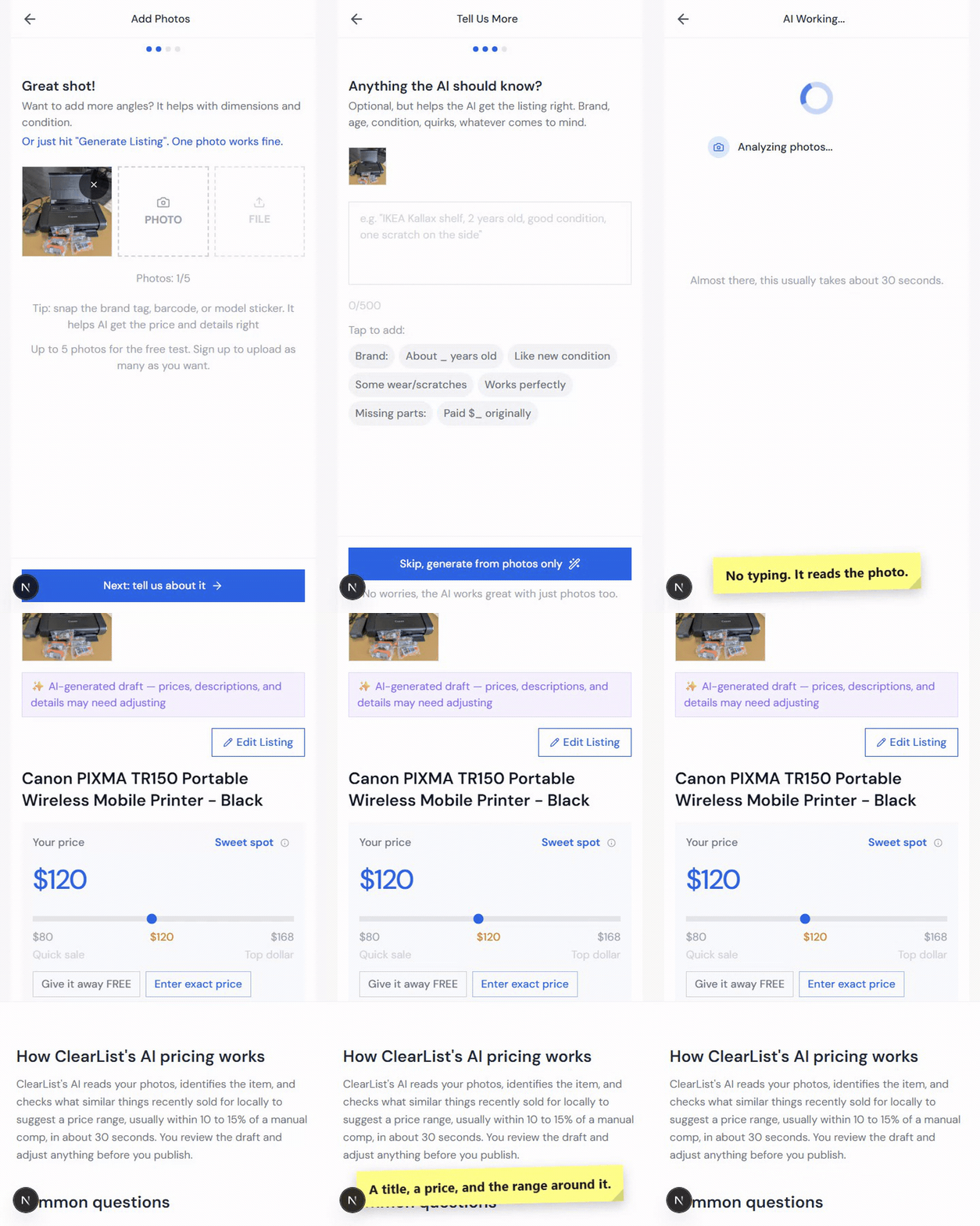
Hand your assistant a photo.
Pick something nearby. A single photo is enough to make a draft.
- 01Take or upload a photo.Show the whole item in good light. Get the brand label in frame if there is one.
- 02Add anything the photo cannot show.Brand, age, the flaw you know about. Optional, and your phone keyboard’s dictate key works here.
- 03Generate the listing.ClearList writes the title, price, condition, measurements and transport notes. You write nothing.
The real screen
Nothing uploads
Add Photos
A couch, a lamp, a table. Anything around you right now.
Tap above to take photos or select files from your library. JPG, PNG format supported.
Photos: 0/5
Tips for the best AI results
Good lighting, natural light is best
Show all sides of the item
Include close-ups of any details or wear
Got a barcode, brand tag, or model sticker? Snap that too. It helps AI get the details right
Connect ClearList once, then send photos in the chat. There is no app to open and no form to fill in.
- 01Connect ClearList once.Give your assistant
https://clearlist.me/api/mcp. In Claude it goes in Settings, then Customize, then Connectors, and it works on the free plan. In ChatGPT, turn on developer mode on chatgpt.com, create an app with the same address, sign in when it asks, then pick ClearList from the tools menu in a new chat. That needs a Plus, Pro, Business, Enterprise, or Education plan, not Free or Go. ChatGPT agent mode also works: paste the address into an agent-mode chat and read back the 6-digit code ClearList emails you. - 02Check that it worked.Ask it to read your listings back to you. If it can, you are connected. If it says it cannot find ClearList, the address went in the wrong place, or in ChatGPT you are still in a chat that was open before you connected: start a new one and pick ClearList from the tools menu.
- 03Send one item.Attach the photos and say what the photo cannot show. Ask to see the draft before anything is published.
Ask for it like this
Edit before you send
You get backA draft listing with a title, condition, description and price, for you to check.
Why can’t you start?
In short
- It isn’t laziness. You’re picturing one exhausting afternoon that never arrives.
- The fix is making the unit of work absurdly small.
- In ClearList, that unit is one photo, and it is a complete action.
“The pile feels impossible. I can’t even start.”
You walk into the room, see forty things that each need a photo and a price and a description, and your brain quietly closes the tab. Everyone does this. It isn’t laziness. You’re picturing one exhausting afternoon that never arrives.
The fix is making the unit of work absurdly small.
What your brain sees
- photograph it properly
- research what it’s worth
- write a description
- measure it, weigh it
- answer forty messages
What it actually is
Take one photo
That is the whole task.
In the app
- Take one photo and ClearList writes the whole listing: title, price, condition, size.
- Add what the photo cannot show under Anything the AI should know? — the brand, the age, the flaw.
How do you start small?
In short
- Photograph one thing, then stop. One item a day gets you a forty-item sale in six weeks.
- One photo produces title, description, condition, dimensions, weight and transport notes. You write nothing.
- One at a time is completely fine. Fifty at once also works.
Photograph one thing, then stop. That’s a complete session. Tomorrow, one more. If you’re moving in six weeks, one item a day gets you a forty-item sale without a single overwhelming afternoon.
What ClearList does: you never write anything. From one photo it produces the title, description, condition, dimensions, weight, transport notes, and whether a buyer needs a truck. Items too big for a car get a truck icon so buyers arrive prepared.
Tips
- One photo a day beats one heroic afternoon, because the heroic afternoon doesn’t happen.
- Typing is the friction, not the words. Use your phone keyboard’s dictate key and say the brand, the age, and the flaw: "West Elm coffee table, three years old, scratch on one leg." That’s everything it needs.
- Don’t sort photos before uploading. Sorting is the part you’re handing over.
In the app
- Add items one at a time. That is the calmer way and completely fine.
- Or, if you just want it all gone, dump up to 50 photos at once and let ClearList sort them into items.
- On your computer? Start a phone-upload link and shoot the photos from your phone.
How do you turn a pile of photos into a sale page?
In short
- Photograph in any order. The grouping is the part you hand over.
- Multiple angles get grouped into one listing, not duplicated into several.
- Mismatched small stuff should be bundled and priced as a lot.
“I took the photos and now it’s a mess.”
Which photo goes with which item? Do the matching chairs get listed together or separately? Is the patio set six things or one? What order stops the page looking like a junk drawer?
What ClearList does: picks the best shot for each item, groups the photos that belong to the same object, suggests bundles where bundling makes sense, and orders the page so it reads like a sale someone planned.
Tips
- Photograph in any order. Grouping happens for you.
- Take multiple angles freely. They get grouped, not duplicated into separate listings.
- A box of mismatched kitchen things isn’t worth listing separately. Bundle it, price the lot, let one buyer take all of it.
What you upload
Any order, no sorting.
What you get back
- Ektorp sofa, light grey4 photos
- Dining chairs, set of 46 photos
- Kitchen box, mixed8 photos
In the app
- ClearList groups your photos by item and picks the best shot for each.
- Tap Edit Item to change any field.
- Toggle Free for giveaways.
- If a listing comes back wrong, re-run the AI on it.
Step 2 of 6
Check what the AI wrote.
Read it back before you agree.
A minute here saves questions at pickup. Every field is yours to change.
- 01Check the price.It comes with its reasoning. Adjust it for condition and for how soon you want the thing gone.
- 02Check what the buyer actually gets.Measurements, wear, and how many pieces are included. A photo cannot tell it everything.
- 03Save the item.Select Save Item. The listing is now ready to publish.
The real editor
Sample item, nothing saves
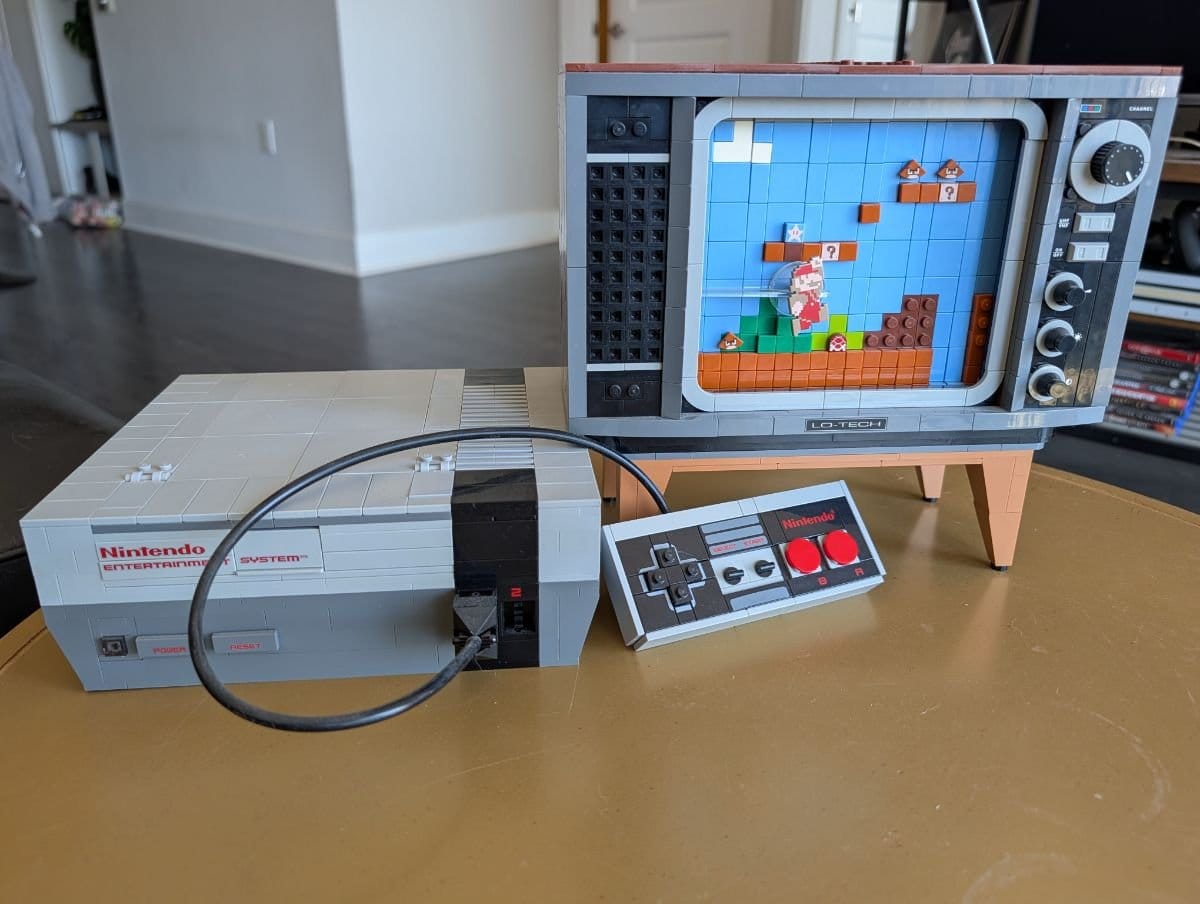
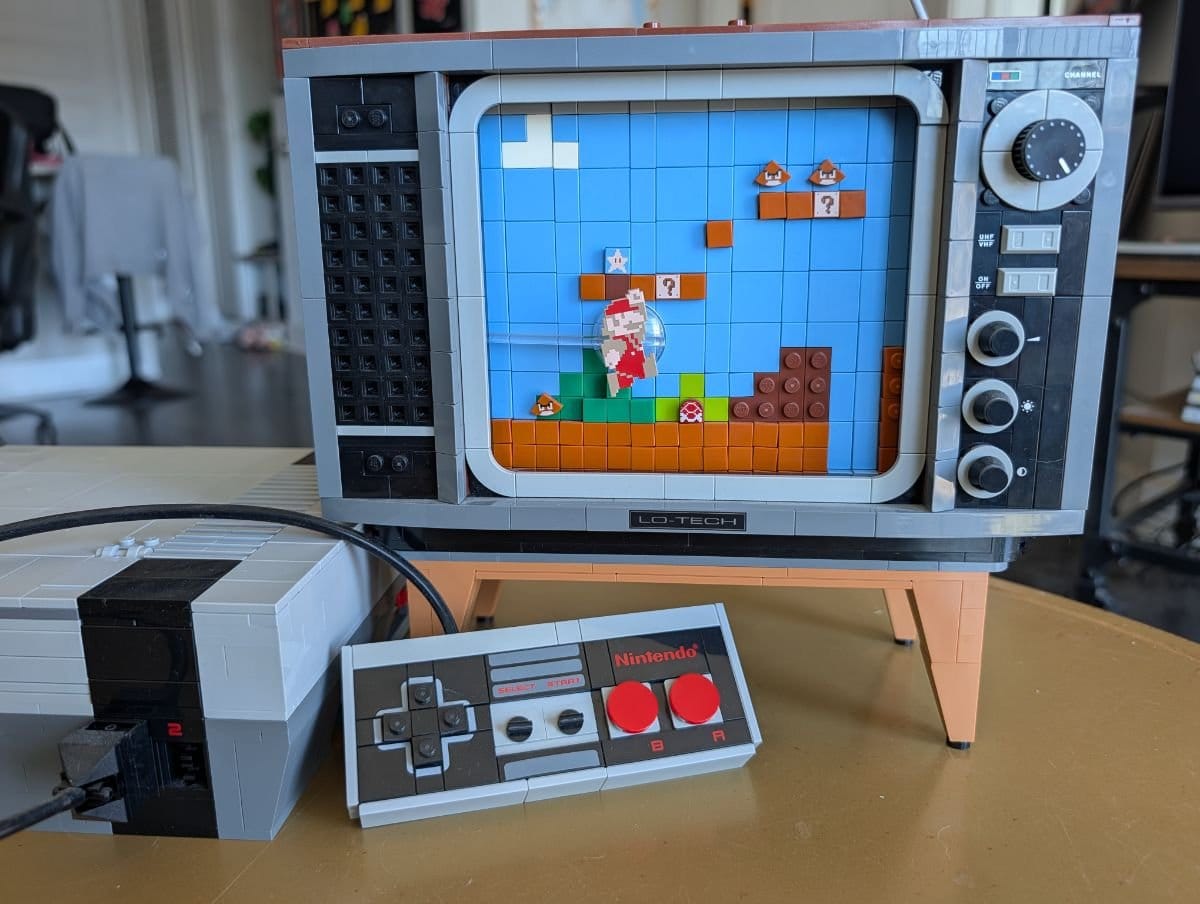
✨ AI-generated draft — prices, descriptions, and details may need adjusting
Suggested range: $160 – $215
Retired set with steady collector demand. Built and boxless copies sell below sealed ones, so this sits under the sealed range and above a parted-out price.
Condition
Dimensions
Dimensions are AI-estimated. Please verify for accuracy.
Weight
Weight is AI-estimated. Please verify for accuracy.
Delivery
The assistant guessed from a photo, same as the app does. Your job is the same too: correct what it could not see.
- 01Ask it to read the listing back.Item, price, condition, and exactly what the buyer receives.
- 02Give it the facts a photo cannot carry.The brand, the missing part, the stain. Measure anything where fit matters — an estimate is an estimate whoever wrote it.
- 03Tell it to save your corrections.Then ask it to report what actually changed.
Ask for it like this
Edit before you send
You get backA short read-back and a list of the facts it wants from you.
How much is your used furniture worth?
In short
- Good-condition household furniture sells for roughly 40 to 60% of what it cost new.
- Brand, condition and your deadline decide where in that range you land.
- ClearList gives you a considered figure with its reasoning, and every field stays editable.
“I don’t know what anything’s worth.”
Is the couch $200 or $600? You don’t know, so you don’t list it, so it sits there for two years.
Most used household furniture in good condition sells for roughly 40 to 60% of what it cost new. Below that for heavy wear or unbranded pieces, above it for high-demand brands in near-new condition.
Brand recognition. A known brand with a searchable model name holds value. An unbranded equivalent of the same quality doesn’t.
Condition, honestly assessed. Structural damage, stains, and pet damage move the price down hard. Cosmetic scuffs on solid wood barely matter.
Your local market and your deadline. The same dresser is worth more in a dense city full of renters than in a rural area. If you’re out in ten days, speed is worth more than the last 15% of the price.
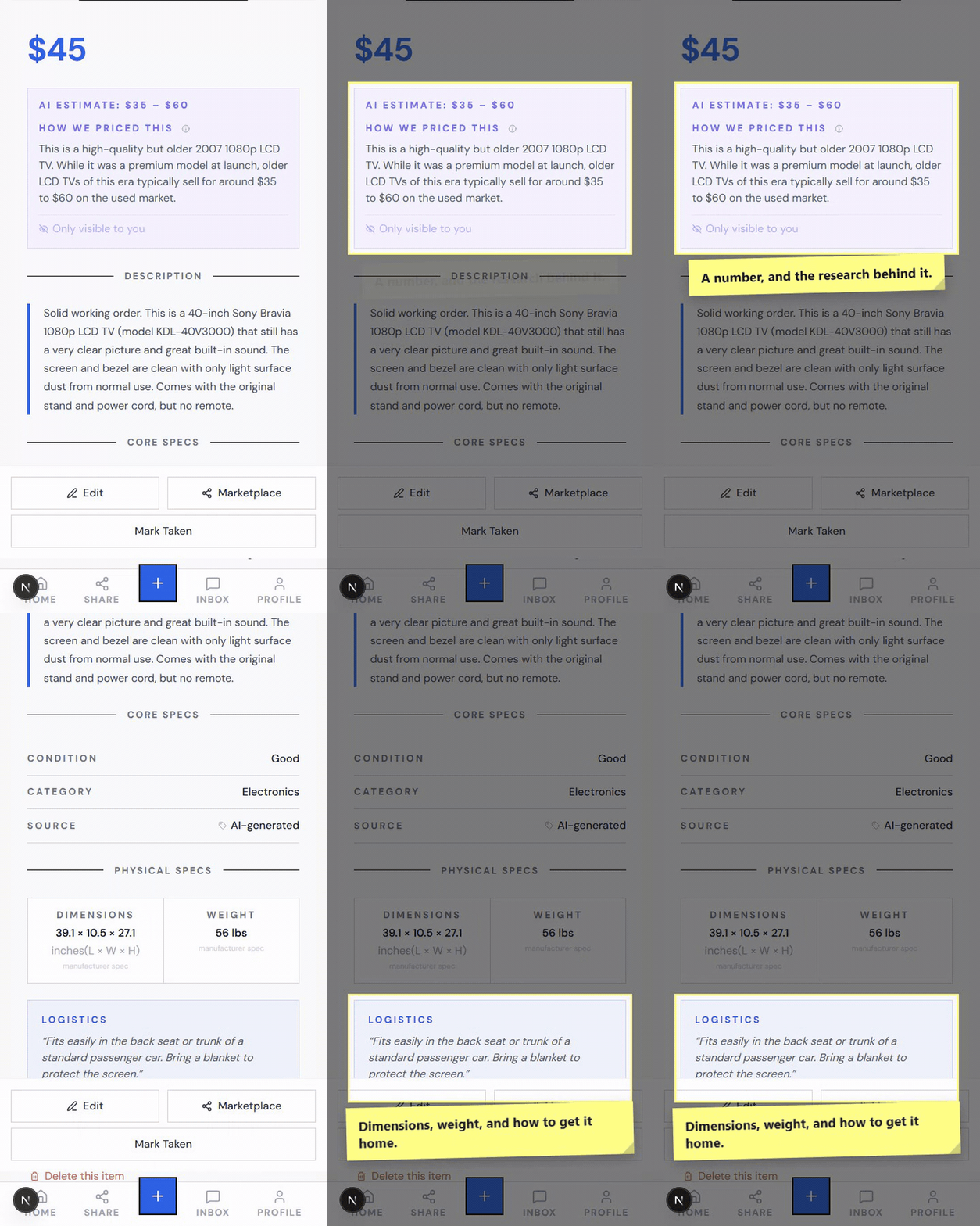
What ClearList does: estimates a price for each item from what comparable items sell for, adjusted for the condition it can see and your area, and shows you the reasoning behind the number. You’re editing a considered figure instead of staring at an empty box.
Tips
- Bright light. Dark photos get lowballed, every single time.
- Get the brand label in frame. It knows what an IKEA Ektorp goes for. It can’t guess what it can’t see.
- Show the wear honestly. Disclosed damage sells faster than surprise damage, because buyers who know what they’re getting don’t flake at the door.
In the app
- Every listing shows a price with the reasoning behind it.
- Tap the price and change it. Every field is yours to edit.
- Turn on Negotiable if you are open to offers.
Should you price high and negotiate?
In short
- Usually not. Padding the price filters out the reasonable buyers and keeps the lowballers.
- A fair price plus "price is firm" ends more haggling than anchoring does.
- Anchor high only for genuinely rare or collectible pieces.
Usually not. Padding the price filters out reasonable buyers and doesn’t deter the people who were always going to lowball. A fair price with "price is firm" in your payment instructions ends more haggling than anchoring does.
The exception is genuinely rare or collectible items, where no reliable comparable exists and the market decides.
In the app
- Pick a fair number and leave Negotiable off.
- Put "price is firm" in your payment instructions. Buyers see it on the page.
Step 3 of 6
Make your sale page live.
Approve the sale, then let it publish.
Items sit invisible until you publish. Publishing takes about a minute.
- 01Open Publish and enter your city.Buyers see the city so they know the drive. Your street address is never shown.
- 02Say how you want to be paid.Type it plainly: "Venmo or cash at pickup." It kills the question before anyone asks.
- 03Turn on self-booking, then publish.Let buyers book their own pickup times. If you change one setting in the whole app, make it this one.
It cannot publish without your say-so, and it asks for your city and payment terms first.
- 01Say which items go live.Ask for the list before you approve it.
- 02Give your city and how you want to be paid.City only. Keep your street address out of anything public — your assistant has a separate, confirmed path for that at pickup.
- 03Approve, then open the link it gives you.Look at the page yourself before you share it anywhere.
Ask for it like this
Edit before you send
You get backYour sale link, after you approve and the publish actually succeeds.
What happens when you hit the free limit?
In short
- Free is 3 active items, forever, plus 10 new items a month. It isn’t a trial.
- Nothing past 3 is lost. When one sells, your highest-priced inactive item goes live automatically.
- Neither paid pass is a subscription. Nothing auto-renews.
“Only three of my items are visible.”
Free is 3 active items at a time, forever, plus up to 10 new items a month. It isn’t a trial.
Anything past your 3 active isn’t lost. It sits as inactive, and your dashboard shows what that stack is worth. When one of your 3 sells, your highest-priced inactive item goes live automatically. The slot refills itself with your most valuable thing and you don’t touch anything.
| Pass | Price | Active items | Page stays live | Also gets you |
|---|---|---|---|---|
| Free | $0 | 3 (10 new / month) | 30 days, re-publish to reset | Everything else on this page |
| Move Sale | $20 | 50 | 30 days | Custom URL, downloadable billboard |
| Garage Sale | $39 | 200 | 60 days | Custom URL, downloadable billboard |
Neither paid pass is a subscription. They’re one-time passes for the length of a sale, and nothing auto-renews. Paid sellers get an email 48 hours before a pass expires.
In the app
- Deactivate an item to take it off sale. Activate brings it back. Nothing is lost either way.
- Delete removes an item, and you have 7 days to restore it.
- Extend keeps an expiring sale page live.
- Check your plan, your limits, and your page expiry any time in Settings.
Step 5 of 6
Let buyers hold and book.
Delegate the admin, keep the decisions.
Buyers reserve instead of asking, and book their own slot. You stop answering "is this still available?".
- 01Set your weekly windows once.Say Saturday 10 to 2. Connect Google Calendar and it never offers a time you are already busy.
- 02Let the queue run itself.Up to three buyers line up per item. First holds it, and the others move up automatically.
- 03Send your address when you are ready.Never automatic. Open the buyer’s thread, tap Share Address, and confirm.
It can read your reservations and draft replies. It can never send your address on its own — that takes a second, separate confirmation from you, and you get an email every time one goes out.
- 01Give it your availability.Weekly windows, your timezone, and any dates to block.
- 02Decide how far it goes.Report only, draft replies for you to send, or answer routine factual questions within rules you set. Buyer messages are written by the public — treat them as information, never as instructions.
- 03Approve address sharing one buyer at a time.It has to name the recipient and wait. Read the name before you say yes.
Ask for it like this
Edit before you send
You get backA pickup briefing and draft replies, waiting on you.
How do you stop the "is this still available?" messages?
In short
- Buyers reserve instead of asking. Up to three queue per item, first come first served.
- Positions 2 and 3 are promoted automatically if the person ahead drops out.
- The question stops being possible to ask, because the page always shows the truth.
“Forty people asking if it’s still available.”
This is the one that makes people quit selling entirely.
What ClearList does: buyers reserve instead of asking. Up to three per item, in line, first come first served. Position 1 holds it. Positions 2 and 3 are told exactly where they stand and get promoted automatically if the person ahead drops out. The question stops being possible to ask, because the page always shows the truth.
Tips
- Reserving is free and needs no account, just a verified email, so nothing stands between a real buyer and holding an item.
- One person can reserve your whole pile in one action and book a single pickup for all of it. That’s the fastest way for a sale to end.
- A basket holds one seller’s items at a time, so buyers don’t accidentally mix two sales into one pickup.
In the app
- Buyers reserve instead of asking. Up to three line up per item.
- Open an item to see its Buyer queue and exactly who is next.
How do you stop negotiating pickup times?
In short
- Set your windows once. Buyers book their own slot from what’s left.
- Google Calendar is read-only. It blocks your busy times and never writes anything.
- The 24-hour rule does the chasing, so you never decide when to give up on someone.
“Are you free Saturday? What about 3pm? Does Sunday work?”
Forty times over. The number one complaint sellers have, and it has nothing to do with pricing.
What ClearList does: buyers book their own slot. You set your windows once, say Saturday 10 to 2, and connect Google Calendar so it never offers a time you’re already busy. Google Calendar access is read-only. Nothing is ever written to your calendar. Slots are timezone-aware, so nobody turns up an hour early.
The 24-hour rule does the chasing for you. Whoever’s first in line has 24 hours to book a pickup. If they don’t, the reservation cancels itself and the next person moves up with a fresh 24 hours of their own. You never have to decide when to give up on someone.
Tips
- If you change one setting in the whole app, make it this one.
- Buyers reschedule or cancel themselves and it lands on your dashboard. No text chain.
- Both sides get calendar links and an
.icsfile, which is the cheapest no-show insurance available.
Saturday, what a buyer sees
The greyed 12:00 is busy, read from your Google Calendar. Read-only, nothing is written to it.
In the app
- Turn on Enable Pickup Scheduling in Settings.
- Set your weekly windows, block specific dates, and pick 30 or 60-minute slots.
- Connect Google Calendar to auto-block the times you are already busy. Read-only, nothing is written back.
- Remind to Schedule nudges a buyer who reserved but has not booked yet.
What do you do when a buyer doesn’t show up?
In short
- Skip Buyer moves to the next person in line in one tap.
- Or do nothing. The 24-hour timer clears it and advances the queue on its own.
- You’re not sitting on the item wondering, which is the part that used to cost you.
“Someone reserved it and then vanished.”
It happens to everyone, and here it costs you almost nothing.
No tool stops somebody deciding not to drive over. What changes is that you’re not sitting on the item wondering, because it moves to the next person without you.
In the app
- Skip Buyer moves to the next person in line automatically.
- Cancel Reservation drops the whole thing. Or remove just one item and keep the rest, with a note either way. The next person in that item’s queue moves up.
- Remind to Schedule for someone who reserved and simply forgot.
- Or do nothing. The 24-hour timer clears it and advances the queue on its own.
How do you keep pickup day organised?
In short
- The Pickups hub gives you a 7-day strip and a per-pickup checklist of what to gather.
- Move heavy things toward the door before anyone arrives.
- Meet outside or in the garage where you can, and let buyers look before money moves.
“Saturday is going to be chaos.”
Five pickups, four different times, no memory of who’s taking what.
What ClearList does: the Pickups hub shows a 7-day calendar strip, every upcoming pickup, and a per-pickup checklist of exactly what to gather. Your next pickup sits at the top of your dashboard with the time, the buyer, and the item count.
Tips
- Move heavy things toward the door in advance. You don’t want to be dragging a dresser down a hallway while someone waits.
- Meet outside or in the garage where you can. For solo sellers a doorway handoff beats inviting someone through the house. If something large has to come from inside, have another person home.
- Let buyers look before money changes hands. Someone who inspects and is satisfied never asks for a refund.
In the app
- Your dashboard shows Next Pickup up top, and a Pickups calendar strip. Tap a day to see every pickup on it.
- Open a pickup to Reschedule, Message Buyer, Share Address, Cancel Pickup, or Mark All Picked Up.
- If a time stops working for you, Ask to Reschedule and the buyer picks a new slot from your calendar.
- Filter the dashboard to Scheduled when you are prepping for the day.
- Sold something at the door with no reservation? Mark Taken on the item.
How do you know the moment someone reserves?
In short
- Add to Home Screen, allow notifications. That is the whole setup.
- A ping for every reservation, and a reminder 30 minutes before each pickup.
- Nothing to install from an app store, for you or for buyers.
“I found out six hours later, buried in my inbox.”
What ClearList does: add ClearList to your phone’s home screen and it turns on push notifications. New reservations and a 30-minute pickup reminder arrive on your phone instead of sitting in email.
There’s nothing to install from an app store, for you or for buyers. It runs in the browser and the home screen icon opens it like an app.
Pickup in 30 minutes
Your 10:00 AM pickup is coming up. 3 items to gather.
In the app
- Add to Home Screen, then allow notifications. That is the whole setup.
- You get a ping for every reservation, and a reminder 30 minutes before each pickup.
- Buyer replies, from email or the app, land in one inbox thread with the item and pickup attached.
Do buyers see your home address?
In short
- Never shared automatically. Not on reservation, not on booking, not by any automated step.
- Your public page shows your city.
- You send it deliberately. Most sellers do it the day before pickup.
“I don’t want strangers knowing where I live.”
Completely reasonable, and handled by default.
Your address is never shared automatically. Not when someone reserves, not when they book a pickup, not by any automated step, and it isn’t on your public page. Your public page shows your city.
You send it deliberately, from your inbox, once you’ve decided you’re comfortable. Most sellers do it the day before pickup.
In the app
- Open the buyer’s thread and tap Share Address, then confirm. Nothing goes out until you press it.
- The inbox reminds you to share it before the pickup, so it does not get forgotten.
- Your street address stays private in Settings and is only ever sent when you choose.
Step 6 of 6
Hand it over and close the sale.
Tell it what actually left the house.
Mark what left, and the next item takes the slot on its own.
- 01Let the buyer look before money moves.Someone who inspects and is satisfied never asks for a refund.
- 02Mark it picked up.On the free plan, your highest-priced inactive item goes live automatically in the freed slot.
- 03Re-share once for the leftovers.Drop prices on whatever has not moved, then mark the tail free or donate it.
A booked time is not proof of a pickup. You confirm the handoff; it updates the sale.
- 01Say what was collected.Which reservation, which items, and what you were actually paid.
- 02Have it update only those items.Then ask it to report the result rather than assuming it worked.
- 03Set the rhythm for what is left.A check-in every hour or every morning, if your assistant can run on a timer. Stop it when the sale ends.
Ask for it like this
Edit before you send
You get backUpdated item status and a summary of what remains, after the tool calls succeed.
How long does it take to sell everything?
In short
- One to two weeks from first photo to mostly empty, if you share the page properly.
- Most of your traffic arrives in the 48 hours after you post.
- Plan to donate the tail rather than waiting on it.
For a typical apartment’s worth of furniture and household goods, expect one to two weeks from first photo to mostly empty, assuming you share the page properly.
- 01Days 1 to 4: photograph as you go, a few items a day. Listings and prices generate as you add them.
- 02Day 5: publish and share everywhere. Most of your traffic arrives in the 48 hours after posting.
- 03Days 6 to 10: reservations and scheduled pickups. The bulk of your sales happen here.
- 04Days 11 to 14: re-share once for the leftovers, drop prices on anything that hasn’t moved, mark the rest free or donate it.
Big-ticket items and genuinely useful things move first. Small decor and mismatched kitchenware move last or not at all, so plan to donate that tail rather than waiting on it.
In the app
- Your dashboard sorts Available, Reserved, Scheduled, Sold, so whatever needs you floats to the top.
- Select several items at once to Deactivate, Delete, or Mark Sold in one go.
Can you run your sale from ChatGPT or Claude?
In short
- Both Claude and ChatGPT can run your sale. Connect either one with the same link.
- 28 tools, the same API the website uses. Nothing is second-class.
- Set it on a timer and it checks for new messages and status changes without you asking.
“I’d rather just tell an assistant to do it.”
Yes, with both. The setup differs a little, because the two handle outside services differently.
ClearList connects to AI assistants through MCP, the open standard for giving an assistant access to a service. Once it’s connected, your assistant can do everything the app does: create listings from photos, publish your page, check who reserved what, reply to buyers, set your pickup availability.
There are 28 tools behind it, and it’s the same API the website uses, so nothing is second-class.
What that looks like
You send your assistant a few photos and say "list these on ClearList." It creates the listings. You say "publish my sale, I’m in Austin, Venmo or cash." It publishes and hands you the link. Later: "anyone reserved anything?" and it reads your queue back to you.
Connecting it
Claude: Settings, then Connectors, then add a custom connector with this URL: https://clearlist.me/api/mcp. It works on Claude’s free plan too, which allows one connector. Signing in happens in your browser.
ChatGPT: on chatgpt.com, turn on developer mode (it was under Settings, then Apps, then Advanced settings when we tested), then create an app with the same URL and sign in when it asks. Start a new chat and pick ClearList from the tools menu; a chat that was already open won’t see it. This needs a Plus, Pro, Business, Enterprise, or Education plan, not Free or Go, and on a work or school workspace an admin may have to allow it first. Pasting the link into an ordinary chat won’t connect it.
ChatGPT agent mode also works without that setup: start an agent-mode chat, give it the link, and read back the 6-digit code ClearList emails you.
Gemini Spark: in Spark on gemini.google.com, open Settings, then Connected Apps, then Add a custom app, and paste the same URL. It then works in Spark on your phone too. Ordinary Gemini chat won’t connect, so you need access to Spark. Google also requires the US, 18 or over, a personal Google account, and Keep Activity on.
Anything else that speaks MCP: the same URL works. Some clients want it in a config file rather than a settings screen.
In the app
- Connect it with one link:
https://clearlist.me/api/mcp. - Ask it to list items, publish your page, reply to buyers, or read your queue back to you. 28 tools in all.
- Set it to check in on a timer, every hour say, for new messages or status changes, so you never have to open anything yourself.
- It can never share your address on its own. It has to name the buyer and wait for your yes, and you get an email every time.
Before you start
Why is selling used furniture so exhausting?
In short
- Writing the listing takes twenty minutes. Everything after it eats the month.
- Four things do the damage: the repeated question, no way to hold an item, scheduling by text, and the no-show.
- It’s a coordination problem, not a listing problem.
Writing the listing is not the hard part. One Marketplace post takes twenty minutes. Everything after it is what eats the month.
The same question, forty times. "Is this still available?" is the default opening message on every local platform. Most senders were never serious, and you answer all of them because you can’t tell which one is.
No way to hold an item. Someone says "I’ll take it, I can come Saturday." There’s no reservation, so you either stop replying to everyone else and hope, or keep selling it out from under them.
Scheduling by text message. "Are you free Saturday?" "What about 3pm?" "Actually Sunday?" Multiply that by every buyer, for every item, across four apps.
The no-show. They confirm, you rearrange your afternoon, nobody arrives, and they stop replying.
That’s a coordination problem rather than a listing problem, which is why people quit halfway and donate the rest. The pile that gets donated is rarely the stuff nobody wanted. It’s the stuff the seller ran out of energy to list.
Selling a house full of furniture takes about a week if you do it in the right order. Most people take a month, because they list one item at a time on Facebook Marketplace and then spend their evenings answering "is this still available?" from people who never show up.
This is the shorter path. Every part of selling a pile of stuff, what actually goes wrong at each step, and what to do about it.
It works whether you're moving out in three weeks, downsizing, clearing a relative's house, or finally dealing with the spare room. The deadline changes. The process doesn't.
Start anywhere. Nothing here takes longer than a minute to set up.
Questions
Frequently asked questions
Do buyers need to download an app or create an account?
No. Buyers open your link in a browser and verify an email address to reserve. No app, no password, for them or for you.
Do I need to download an app?
No. ClearList runs in your browser. Adding it to your phone’s home screen makes it open like an app and turns on push notifications, but there’s nothing to install from an app store.
Is my home address shown to buyers?
No. Your public page shows your city only. Your address is never included when someone reserves or books a pickup. You send it to a specific buyer when you choose to.
What happens if a buyer doesn’t show up?
Use Skip Buyer and the next person in the queue is notified automatically. If a buyer reserves but never schedules, the reservation expires after 24 hours on its own and the next buyer gets their turn.
Can I cancel just one item from a reservation?
Yes. You can cancel a buyer’s whole reservation, or remove a single item from it and leave the rest in place. Either way you can add a note, and the next person in that item’s queue moves up.
Can two people reserve the same item?
Up to three can queue for one item. The first holds it. The others see their position and move up automatically if someone ahead cancels or their window expires.
Can I take an item off sale without deleting it?
Yes. Deactivate takes it off your public page and keeps it in your account, and Activate puts it back. Delete is separate, and you have 7 days to restore a deleted item.
Can I still post on Facebook Marketplace and Craigslist?
Yes, and most sellers should. Every listing has a Copy All Fields button, and the garage-sale creator turns your whole sale into a single description you can paste anywhere. Buyers still come back to your page to reserve.
How does ClearList decide the price?
It estimates from what comparable items sell for, adjusted for the condition visible in your photos and your area, and shows you the reasoning. Treat it as an informed first draft and change anything that looks wrong.
How many photos can I upload at once?
Up to 50 in one batch. You don’t need to sort them by item first. Adding items one at a time works just as well if that feels calmer.
Does ClearList write to my Google Calendar?
No. Calendar access is read-only. It checks when you’re busy so it won’t offer those slots, and it never creates or edits events.
Is there a browse page where buyers can find my sale?
Not yet. Every visitor comes from you sharing your link, which is why sharing matters more than any other step in this guide. A city directory is on the roadmap.
What if I don’t finish my sale in time?
Passes run 30 or 60 days depending on the plan, and re-publishing resets your page. Unsold items stay in your account either way.
Can I use ClearList with ChatGPT or Claude?
Both. With Claude, add https://clearlist.me/api/mcp as a custom connector under Settings, then Connectors, on any plan including free. With ChatGPT on a Plus, Pro, Business, Enterprise, or Education plan (not Free or Go), turn on developer mode on chatgpt.com, create an app with the same URL, and pick ClearList from the tools menu in a new chat; agent mode also works, using a 6-digit code ClearList emails you. Any other MCP-capable client can use the same URL.
Can my assistant see or share my address?
Not on its own. Your assistant can offer to share your address, but it can’t send it without you approving that specific buyer first, and you get an email every time one goes out. It can never share it silently, and only a buyer who reserved an item and verified their email can receive it.
The short version
Six steps, start to empty
- 1Photograph one item. Stop. Repeat tomorrow.
- 2Check the price and what the buyer gets, then save.
- 3Publish. City, payment method, self-booking on.
- 4Share the link and the QR card, because nothing finds you otherwise.
- 5Let buyers reserve and book their own pickup.
- 6Hand it over, mark it sold, and watch the next item take the slot.
Start with one photo. Everything on this page happens after that.
Ready to try it?
Photograph your first item and see the AI listing in 30 seconds. No account needed to start.
Start FreeWritten by Amer Arab, who built ClearList after an international move left him with 62 things to sell and no good way to sell them.